
Limit Items Dynamically
For some advanced use cases you might want to limit a grid dynamically based on certain variables.
Fields you can limit by
Section titled “Fields you can limit by”Limiting by Taxonomy Terms
Section titled “Limiting by Taxonomy Terms”An example use case would be the inclusion of a grid on the taxonomy.php page and filtering that grid by that specific term.
In the Premium version this is possible by adding parameters to the grid or grid-with-filters shortcode:
[wpupg-grid-with-filters id="my-grid" post_tag="1;3"]This shortcode would use “my-grid” as it is and dynamically filter it before displaying, limiting it to only posts that are tagged with term id 1 or 3. You can look up those term IDs in the URL of the term edit page.
Instead of “post_tag” you can use any other taxonomy (like “category” or any custom taxonomy).
Limiting by Post ID
Section titled “Limiting by Post ID”It is also possible to dynamically filter posts by post ID:
[wpupg-grid-with-filters id="my-grid" post_id="28;88"]Or even exclude certain posts by ID:
[wpupg-grid-with-filters id=”my-grid” exclude_post_id="9"]Instead of an actual post ID you can also use “current_post” to represent the post ID of the page that is displaying the grid. For example:
[wpupg-grid-with-filters id="my-grid" exclude_post_id="current_post"]Limiting by Author
Section titled “Limiting by Author”Another option is to limit by a specific author:
[wpupg-grid-with-filters id="my-grid" author="3;8"][wpupg-grid-with-filters id="my-gr" exclude_author="3;8"]Instead of the author ID you can also use “current_user”. This can be used to have a grid that only displays post by the currently logged in user, for example:
[wpupg-grid-with-filters id="my-grid" author="current_user"]Dynamically limiting offset or total item limit
Section titled “Dynamically limiting offset or total item limit”With the “item_limit” and “item_offset” attributes you can also dynamically change the total number of items shown in the grid, and the offset that should be used when retrieving items for that grid. This could be used to split a grid in different parts, for example.
This code would show a grid of maximum 5 items, starting at item 11:
[wpupg-grid-with-filters id="my-grid" item_limit="5" item_offset="10"]Dynamic Filtering in the Block Editor
Section titled “Dynamic Filtering in the Block Editor”In the Gutenberg Block Editor you could either work with the shortcode or set those same parameters in the sidebar of the Grid or Grid with Filters Block:
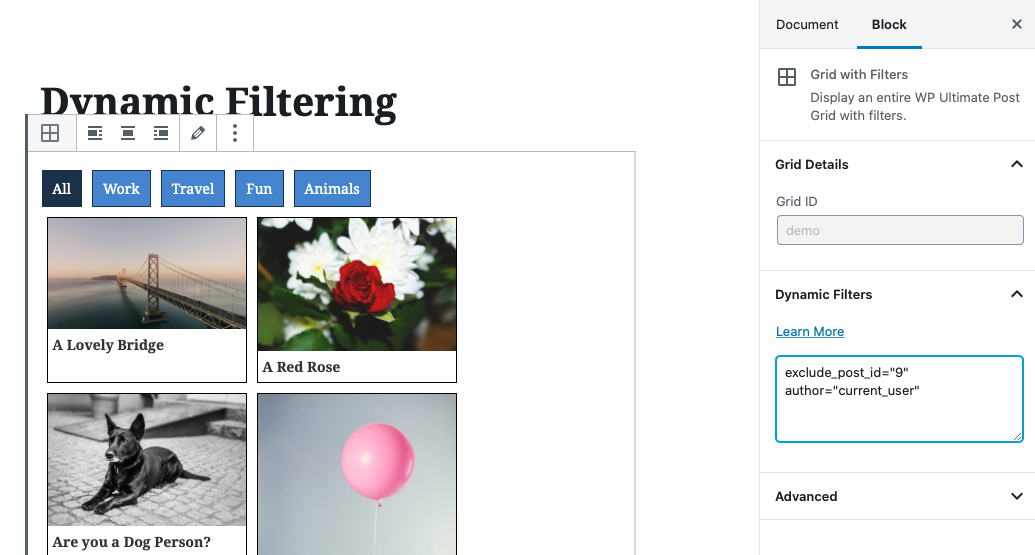
Take note that you don’t add the full shortcode here, only the parameters you want to pass along.
Dynamic Filtering for Category Grids
Section titled “Dynamic Filtering for Category Grids”For category grids you have similar options by using the term_id and exclude_term_id attributes. For example:
[wpupg-grid-with-filters id="my-category-grid" exclude_term_id="current_term;42"]