
Ingredient Singular and Plural
You can configure forms for both ingredient names, such as “egg” and “eggs”, and ingredient units, such as “cup” and “cups”. WP Recipe Maker uses these forms when quantities change, for example through adjustable servings with the Premium, Pro or Elite plugin.
Ingredient names
Section titled “Ingredient names”Go to the WP Recipe Maker > Manage > Recipe Fields > Ingredients page and make sure the “Plural” column is enabled at the top. You can then click on the icon to set the plural version of an ingredient.
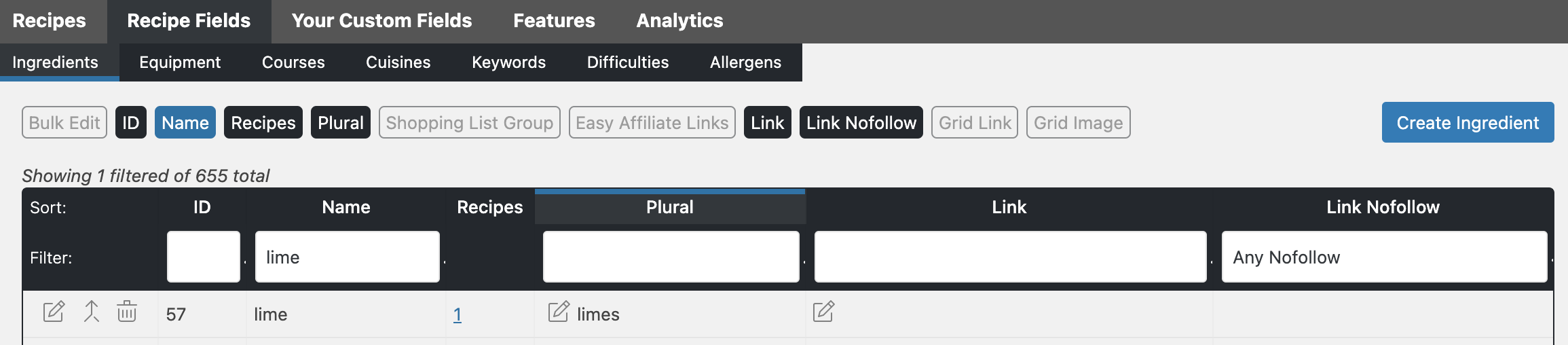
While setting this, the “Merge” icon (second to the left) can be helpful to merge any existing plural versions into the singular one first.
Ingredient units
Section titled “Ingredient units”- Go to WP Recipe Maker > Manage > Recipe Fields > Ingredient Units.
- Make sure the “Plural” column is enabled at the top.
- Use the singular spelling as the unit’s name, for example “cup”.
- Click the pencil icon in that unit’s “Plural” column and enter “cups”. Confirm the prompt to save it.
If you already have separate “cup” and “cups” entries, you can use the “Merge” action to merge the plural entry into the singular entry before setting its plural form. Renaming or merging a unit updates recipes using that unit, so check those recipes before making the change.
Only configured forms change
Section titled “Only configured forms change”WP Recipe Maker uses the unit’s name and its explicitly configured “Plural” value as a pair. When the pair is available, positive quantities up to and including 1 use the singular form; quantities above 1 use the plural form. For example, a configured “cup”/“cups” pair can display ½ cup, 1 cup and 2 cups.
If the unit has no configured plural, quantity changes preserve the unit text entered in the recipe. WP Recipe Maker does not guess a different spelling or change its capitalization or abbreviation. For example, an unconfigured Tbsp, tsp, Cup or cups stays exactly that way, even when the quantity changes to 1. Ingredient names also need a configured plural before WP Recipe Maker can switch their forms automatically.
For Unit Conversion, configure forms for the units used in each system. The “Singular” and “Plural” columns in the Unit Conversion settings control the text generated during conversion; the forms under “Manage > Recipe Fields > Ingredient Units” control changes as quantities are adjusted.
Rounded quantities in ingredient splits
Section titled “Rounded quantities in ingredient splits”For ingredients split between instruction steps, the singular or plural form follows the displayed, rounded quantity. For example, if a split calculates to 1.02 cups but your fraction settings display it as 1 cup, the configured unit uses “cup”. If the displayed quantity remains 1.02, it uses “cups”. Configured ingredient names follow the same rounded quantity, and unconfigured units keep their entered text.