
Updating WP Recipe Maker
It’s recommended to always update to the latest version, so make sure to keep up!
Updating the free WP Recipe Maker plugin
Section titled “Updating the free WP Recipe Maker plugin”WordPress is the one handling updates for free plugins. You should get notified of any updates on the Plugins page in your backend and perform the update there by clicking on “Update Now”:

Should an update not show up here, you can try to force a check for updates by clicking on “Check Again” on the Dashboard > Updates page. Alternatively you can also download the latest version of the plugin over at the wordpress.org repository.
Updating WP Recipe Maker Premium, Pro or Elite Bundle
Section titled “Updating WP Recipe Maker Premium, Pro or Elite Bundle”If you use one of our paid plugins, there will be 2 plugins to update: the free plugin (which is updated as shown above) and the Premium/Pro/Elite Bundle.
There are 2 ways you can update the paid plugin:
Easy – Updating through the Plugins Page
Section titled “Easy – Updating through the Plugins Page”If you’ve activated your license key you should get notified of and be able to do updates just like the free plugin, with an update notification showing up on the Plugins page in the backend:

If this notification does not appear, make sure to double check your license key. You can also try forcing a check for updates by clicking on “Check Again” on the Dashboard > Updates page.
Harder – Manually updating the paid plugin
Section titled “Harder – Manually updating the paid plugin”If you’re not getting the notification it’s also possible to perform a manual update by manually downloading the latest version and uploading it to your site:
- Download the latest version of the plugin from our website
- Follow the installation instructions again
, replacing the current plugin file
The free plugin should remain active like before.
Version mismatch?
Section titled “Version mismatch?”The free and Premium/Pro/Elite plugin do not always need to have the exact same version number. It is however possible that you’re using a version of either plugin that’s not compatible with the other and requires an update. There will be a message warning you about this at the top of every admin page.
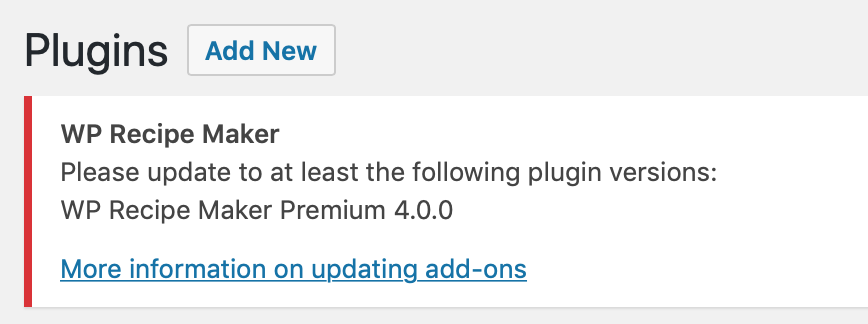
If you see a message like this, make sure to follow the instructions above for updating the Premium, Pro or Elite Bundle or the paid features will not be working.