
Skip to content
  • Home
  • PluginsExpand
    • WP Recipe Maker
    • WP Ultimate Post Grid
    • Easy Affiliate Links
    • Easy Image Collage
    • All-Access Pass
  • FAQ & Support
  • About Us
  • Blog
  • Your Account
Bootstrapped Ventures Knowledge Base
  • Get the Plugin
  • DocumentationExpand
    • WP Recipe Maker
    • WP Ultimate Post Grid
    • Easy Affiliate Links
    • Visual Link Preview
    • Custom Related Posts
  • Open a Support Ticket
Bootstrapped Ventures Knowledge Base

Getting Started

10
  • WP Recipe Maker 101
  • Installing WP Recipe Maker
  • Activating your license key
  • Updating WP Recipe Maker
  • An overview of WP Recipe Maker
  • Creating a recipe
  • Editing a recipe
  • Filling in the Recipe Fields
  • Managing Recipes
  • Recipes and their Parent Post, Page or Custom Post Type

Video Tutorials

10
  • An overview of WP Recipe Maker
  • Displaying recipes in a grid or index
  • Template Editor
  • Taxonomy Term Images
  • Share Buttons
  • Adding a Grow.me Button
  • Nutrition Label
  • Translation API
  • Recipe Collections
  • Add Recipe to collections through Link

SEO & Metadata

8
  • Recipe Metadata for SEO
  • Metadata for Guided Recipes
  • Metadata for How-to Instructions
  • Recipe Metadata Checker
  • ItemList metadata for Recipe Roundup posts
  • ItemList Metadata for Archive Pages
  • Health Check
  • Pinterest Rich Pins

Template Editor

1
  • Template Editor
  • Features
    • Mobile Friendly Templates
    • Recipe Snippets Template
    • Using a different template for a recipe
    • List Checkboxes
    • Recipe placeholders you can use
    • Using conditions in the recipe template
    • Adding text, HTML or 3rd party shortcodes
  • How-To
    • Changing template colors
    • Changing template fonts
    • Changing template labels
    • Changing recipe image size
    • Changing instruction image size and alignment
    • Changing ingredient and instruction list styles
    • Changing the star rating color
    • Changing the adjustable servings display mode
    • Changing the Unit Conversion style
    • Changing the nutrition label​ style
    • Adding a Call to Action
    • Adding the Recipe Pin button
    • Removing the Recipe Video
    • Using smooth scroll for the Jump to Recipe button
    • Removing the Print Recipe button from the snippet at the top of a post

Nutrition Facts

5
  • Nutrition Label
  • Nutrition Facts Calculation
  • Custom Nutrition Ingredients
  • Custom and Calculated Nutrients
  • Translation API

Recipe Collections

5
  • Recipe Collections
  • Using the Recipe Collections
  • Saved Recipe Collection
  • Quick Access Shopping List
  • Displaying the Recipe Collections feature
  • Features
    • Ingredient Groups for the Shopping List
    • Add to Recipe Collection button
    • Changing the Recipe Collections layout
    • Use custom recipes, ingredients and notes in your collections
    • Display nutrition facts per column for your collections
    • Add Collections through Link
    • Setting default collections for new users
    • Quick add pre-made collections
    • Starter Templates for Collections
    • Add Recipe to collections through Link
    • Show the Shopping List for a Saved Collection
    • Restricting access to the Recipe Collections feature
    • Viewing and editing Recipe Collections of your users
    • Altering the Recipe Collections search with WP Extended Search

Import & Export

7
  • Importing recipes from other plugins
  • Custom Recipe Importer
  • Import recipe from text
  • Import Recipes from JSON
  • Export Recipes to JSON
  • JSON import and export for Taxonomy Terms
  • Import recipes from the Paprika Recipe Manager app
  • Importing from Plugins
    • Import from Tasty Recipes
    • Import from WP Delicious
    • Import from Create by Mediavine
    • Import from Recipe Card Blocks by WPZOOM
    • Import from WP Ultimate Recipe
    • Import from EasyRecipe
    • Import from Meal Planner Pro
    • Import from BigOven
    • Import from Ziplist
    • Import from Yummly
    • Import from Recipe Card
    • Import from FoodiePress
    • Import from Cooked
    • Import from Cookbook
    • Import from Simple Recipe Pro
    • Import from Purr Recipe Plugin
    • Import from Recipes by Simmer
    • Import from WordPress.com Shortcode
    • Import from Recipes Generator

Integrations

14
  • Displaying recipes in a grid or index
  • Easy Affiliate Links Integration
  • How to use this for a multilingual blog
  • Clickable images for Lightbox integration
  • Google AMP Compatible
  • Google Analytics 4 Event Tracking
  • Link Amazon Products to Equipment
  • SmartWithFood Shoppable Recipes
  • Shop with Instacart Button
  • Shop with Walmart Button
  • Chicory In-Recipe Ads and Shoppable Button
  • Adding a Grow.me Button
  • Adding a Slickstream Favorites button
  • What theme do you recommend for WPRM?

WP Recipe Maker FAQ

6
  • Translating text in the plugin
  • Automatic archive pages for taxonomy terms
  • Using fractions for ingredient amounts
  • Can I add more diet terms?
  • Setting your own YouTube Data API key
  • How to disable pinning for recipe images

Common Issues

10
  • Recipes Don’t Have the Correct Parent Post
  • API Status
  • Google is sending me Recipe Metadata Warnings
  • Missing field “aggregateRating” in metadata
  • Prevent CLS issues
  • 403 Forbidden Error
  • Cloudflare Firewall Issues
  • Error message when saving a recipe
  • The recipe video is not displaying inside of the recipe card
  • Empty recipe after saving

WPRM for Developers

11
  • The Recipe Post Type
  • Recipe Shortcodes
  • Access recipes in a post via code
  • Show default WordPress UI for taxonomies
  • Using the Recipe Object for front-end changes
  • Plugin hooks and filters
  • WordPress REST API
  • Custom Recipe Importer
  • How themes can style WP Recipe Maker
  • Create your own template
  • Adding your own SVG icons for the Template Editor

Announcements

9
  • WP Recipe Maker Changelog
  • Version 9.4.1 – About those recipe ratings
  • Version 5.6.0 – Some highly anticipated features!
  • Version 5.3.0 – All about the Nutrients
  • Version 5.2.0 – How-to recipes and more!
  • Version 5.0.0 – Introducing a new User Interface
  • Version 4.0.4 – Changing the look of the Cutout template
  • Migrating from Legacy to Modern mode
  • What about WP Ultimate Recipe?

Debugging Plugin Issues

4
  • Debugging plugin problems
  • The downloaded plugin is not a zip archive
  • Flushing permalinks to fix 404 errors
  • Creating a Temporary Login
View Categories
  • Home
  • Documentation
  • WP Recipe Maker
  • Integrations

Chicory In-Recipe Ads and Shoppable Button

See Chicory’s shoppable button in action

Chicory monetizes your content with contextual, in-recipe ads that make sense for your food site, and offers your audience a seamless shoppable experience at 70+ integrated retailers, including Walmart and Instacart. Available in the U.S. only.

To install, please visit the WP Recipe Maker > Settings > Integrations page and follow the steps below. 

  1. Complete this sign-up form to register directly with Chicory. This is required to set up earnings payment.
  2. Enable Chicory by toggling on the first switch under “Activate Chicory.” Once enabled, two additional sections will appear below.
  3. Enable Chicory’s shoppable recipe button by toggling on the second switch.
  4. Enable Chicory’s in-recipe ads by toggling on the third switch.

In-Recipe Ads

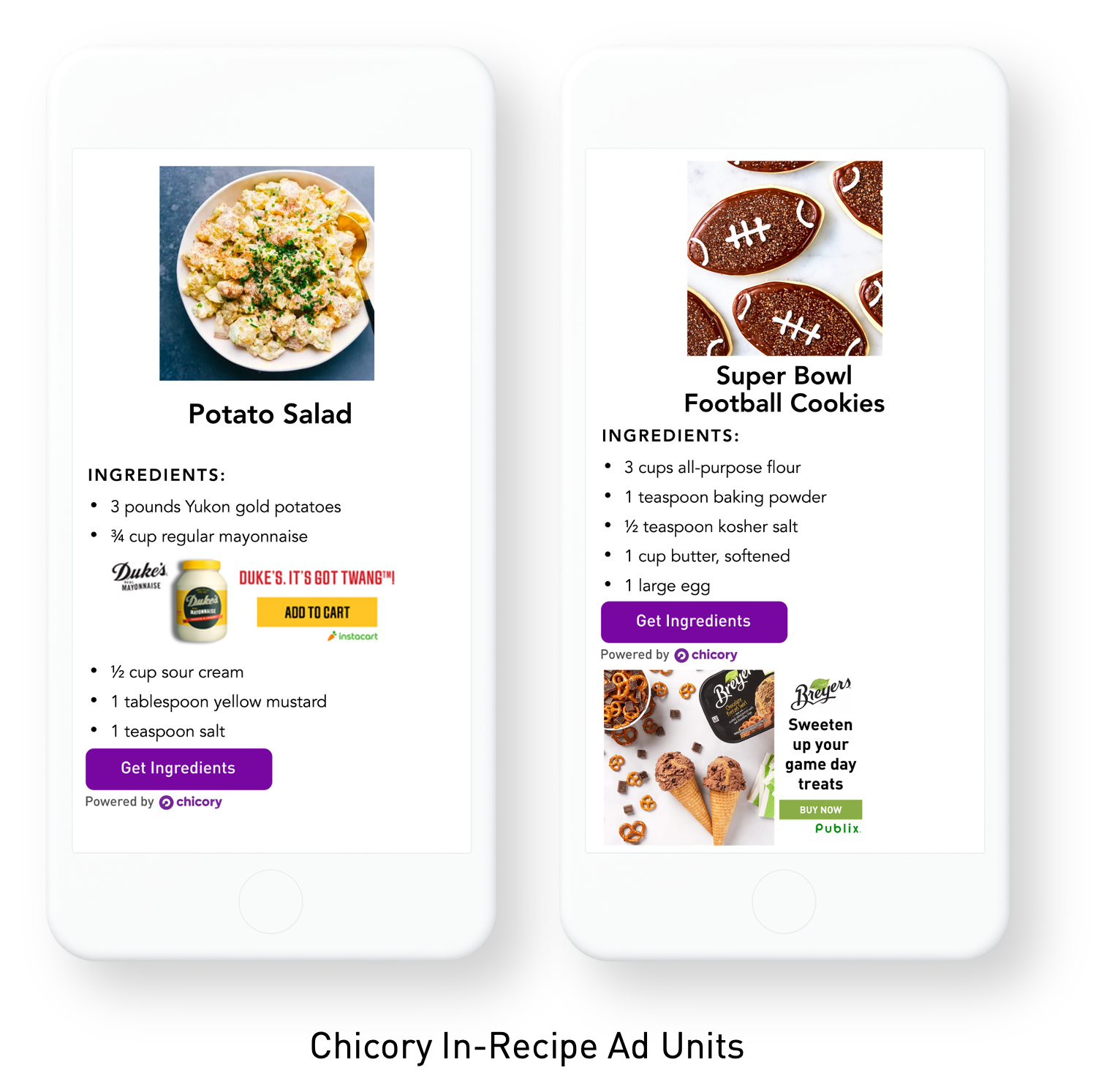
Chicory’s in-recipe ads will appear within and below your recipes’ ingredient lists, allowing you to secure earnings from relevant grocery advertisers. 

The ads are contextually targeted to your recipes, which means they’ll only provide your site visitors with relevant product recommendations. For example, a user may see an ad for chocolate chips within a chocolate chip cookie recipe. 
Shoppable Recipe Button

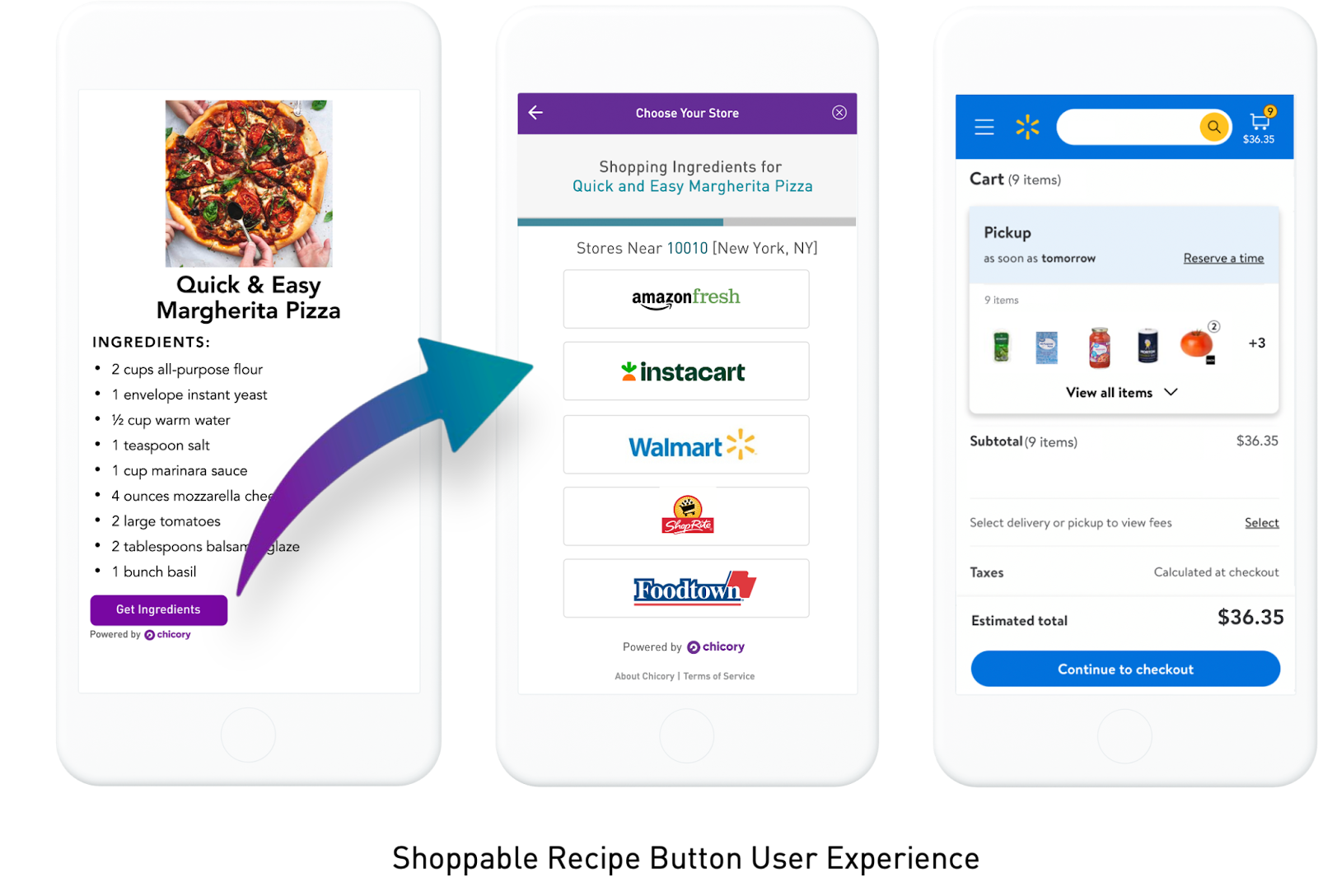
Chicory’s Shoppable Recipe Button will appear below your recipes’ ingredient lists, allowing users to cart the ingredients for your recipes at their retailer of choice. Chicory has direct integrations with 70+ retailers. This functionality enhances the value of your site for users, increasing the likelihood that they will return to your recipes for inspiration and meal planning.
 

Payment Information

In order to receive earnings payment, you must complete this sign-up form.  

Once you’ve successfully installed Chicory through WP Recipe Maker, you will receive a confirmation email, followed by an email providing access to your earnings dashboard.  

Please login to the earnings dashboard to enter your PayPal information. From there, you will be paid on a net-60 schedule. Please visit our FAQ page for more information.

FAQs

Q: Will Chicory slow down my site or impact my Core Web Vitals scores? 

A: No, Chicory’s lightweight tech loads asynchronously to avoid negatively impacting page load speed and is optimized according to Google’s standards to ensure minimal impact to your Core Web Vitals scores.


Q: Can I opt-out of including Chicory on specific posts?

A: Yes, you can opt-out specific recipes on your site from featuring Chicory advertising. To do so, please reach out to publishers@chicory.co.


Q: I installed Chicory but am not seeing the Shoppable Recipe button or in-recipe ads appear on my site yet. Why is this?

A: Chicory’s technology is triggered by site traffic and will appear when a site visitor lands on a recipe. All of your recipes will enter Chicory’s system as users visit those pages. Please note, it may take some time for all of your recipes to import. This process may take up to an hour after you first view the recipe. 


Q: I’m an international content creator. Can I work with Chicory?

A: Yes! Chicory works with international bloggers who have a readership within the United States. However, our retailer integrations only deliver within the United States and our in-recipe ads only display within US zip codes.


Q: I work with an ad network already. Am I able to activate Chicory?

A: Yes! Many creators that work with Chicory are also affiliated with other ad networks. In fact, we have direct partnerships with Mediavine and SHE Media Collective. Mediavine creators can enable Chicory directly within their Mediavine dashboard. SHE Media creators will have Chicory installed on their site upon joining their ad network.


Q: What are the details of your payment policy?

A: Content creators who work with Chicory directly will be paid in full, every month, on a net-60 schedule. In order to receive a payment, the email associated with your PayPal account must be entered into your Chicory dashboard in the My Account tab. All payments will be sent out through PayPal unless otherwise discussed.


If you are a Mediavine blogger using Chicory, your payments will come via Mediavine, on Mediavine’s payment schedule. All questions regarding payments should be directed toward publishers@mediavine.com.

For more questions regarding Chicory’s in-recipe ads or shoppable button, please visit their full FAQs page. 

Troubleshooting

For further assistance, please reach out to publishers@chicory.co for support.

Updated on December 4, 2024
Shop with Walmart ButtonAdding a Grow.me Button
Table of Contents
  • In-Recipe Ads
  • Shoppable Recipe Button
  • Payment Information
  • FAQs
  • Troubleshooting

© 2025 Bootstrapped Ventures · BE0634.767.406
Privacy Policy

  • Bootstrapped Ventures
  • Plugins
    • WP Recipe Maker
      • Demo
      • Documentation
      • Get the Plugin
    • WP Ultimate Post Grid
    • Easy Affiliate Links
    • Easy Image Collage
    • All-Access Pass
  • FAQ & Support
    • Knowledge Base
    • Documentation
  • About Us
  • Blog
  • Your Account