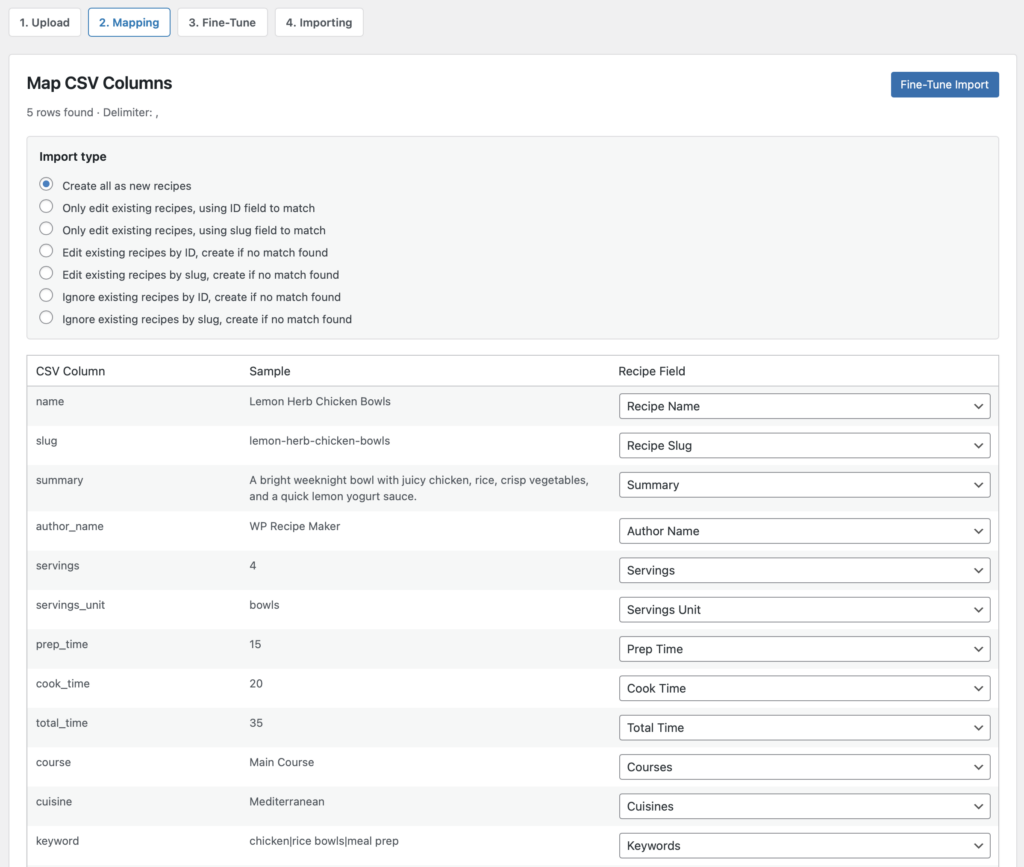
The Import Recipes from CSV feature lets you create new recipes, or update existing recipes, by uploading a CSV file and matching its columns to WP Recipe Maker recipe fields. This is useful when you working with exported spreadsheet data, or preparing multiple recipes outside of WordPress before importing them in bulk.
For a complete recipe import we do recommend using the Export to JSON and Import from JSON features instead.
Example CSV File
You can use this example file to test the importer:
https://help.bootstrapped.ventures/wp-content/uploads/2026/05/import-recipes-from-csv-example.csv
The example contains 5 recipes with common fields such as recipe name, slug, summary, servings, prep time, cook time, taxonomies, ingredients, instructions, notes, and calories.
Preparing Your CSV File
Your CSV file should have a header row, with one recipe per row underneath it. Each column can then be mapped to a recipe field during the import.
Recommended columns include:
- name: The recipe name.
- slug: The recipe slug. This is useful when updating existing recipes by slug.
- summary: A short recipe description.
- author_name: The recipe author.
- servings: The number of servings.
- servings_unit: The label for the servings.
- prep_time, cook_time, total_time: Times in minutes. Values like `1 hour 15 minutes` also work.
- course, cuisine, keyword: Taxonomy terms. Use `|` or commas to separate multiple values.
- equipment: Equipment names. Use `|` or commas to separate multiple values.
- ingredients: Ingredient lines. Use `|` or line breaks to separate ingredients.
- instructions: Instruction steps. Use `|` or line breaks to separate steps.
- notes: Recipe notes.
- calories: Calories per serving.
You do not need to use all of these columns. Only map the columns you want to import.
Formatting Ingredients and Instructions
For simple imports, put all ingredients in a single `ingredients` column and separate each ingredient with a pipe character:
"2 cups flour|1 egg|1 cup milk"
You can also add ingredient group headings by starting an item with `#`:
"# Batter|2 cups flour|1 egg|1 cup milk|# Topping|2 tablespoons maple syrup"
Instructions work the same way:
"Mix the batter.|Heat a skillet.|Cook until golden."
During the Fine-Tune Import step, you can choose how ingredient and instruction columns should be split. The importer can split by line breaks, pipes, commas, semicolons, sentences, or numbered steps.
Importing the CSV
- In your WordPress admin, go to WP Recipe Maker > Import Recipes.
- Choose Import from CSV.
- Upload your CSV file.
- Match each CSV column to the correct recipe field.
- Click Fine-Tune Import to preview the recipes and adjust parsing options.
- Review the preview and deselect any rows you do not want to import.
- Click Import Recipes.
The imported recipes are created as drafts, so you can review them before publishing.
Updating Existing Recipes
The importer can also update existing recipes. Choose the import type that matches how you want to identify existing recipes: